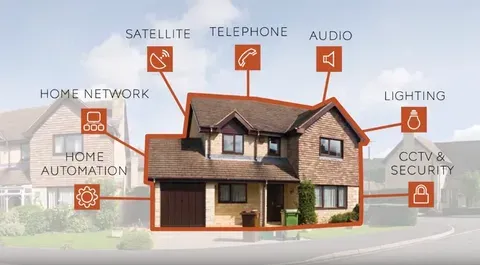
Your Home, Smarter Than Ever
Picture this: You walk through your front door, and the lights turn on automatically. Your favorite playlist starts playing. The thermostat adjusts to your perfect temperature. All without touching a single switch.
Welcome to 2026, where smart home automation isn't just for tech geeks anymore. It's for everyone.
According to Best Buy's smart home services data, over 60% of American households now have at least one smart device. The question isn't whether to get smart home devices—it's how to do it right without wasting money.
This guide breaks down everything about smart home installation costs, from budget DIY projects to high-end professional systems. Whether you're in Los Angeles searching for “smart home installation near me” or planning your first smart speaker purchase, we've got you covered.
Let's dive into what it really costs to build your connected home in 2026.
What Does Smart Home Installation Actually Cost?
The Real Numbers (No BS)
Here's the truth: smart home installation costs vary wildly.
Budget DIY Setup: $500-$1,500
Smart speaker
Few smart bulbs
Video doorbell
Smart plug or two
Mid-Range Home: $2,000-$8,000
Multiple rooms covered
Smart thermostat
Security cameras
Smart locks
Lighting automation
Premium Professional System: $10,000-$50,000+
Whole-home integration
Professional installation
Control4 or Crestron systems
Custom programming
Most homeowners land in the $3,500-$6,000 range according to recent market data.
Price Breakdown by Device Type
Essential Smart Home Devices
Smart Speakers & Hubs:
Amazon Echo Dot: $30-$50
Google Nest Mini: $30-$50
Amazon Echo (4th Gen): $100
Google Nest Hub: $100
Apple HomePod Mini: $99
Installation: Plug and play (5 minutes)
Smart Thermostats:
Google Nest Learning: $249
Ecobee SmartThermostat: $249
Honeywell T9: $199
DIY Install: Free (1-2 hours)
Professional Install: $150-$400
Smart Security Basics:
Ring Video Doorbell: $100-$230
Nest Doorbell: $180
Arlo Pro 4 Camera: $200
Wyze Cam v3: $36
Professional installation: $100-$250 per device
H4: Advanced Smart Home Systems
Whole-Home Automation:
Control4 System: $5,000-$15,000
Crestron Home: $10,000-$50,000+
Savant: $8,000-$25,000
Professional installation REQUIRED
Smart Lighting Systems:
Philips Hue Starter Kit: $200
Lutron Caseta (5 switches): $250
LIFX Bulbs: $60 each
Installation: DIY for bulbs, $150-$400/room for switches
2026 Smart Home Cost Table (Complete Breakdown)
Device Category | DIY Cost | Pro Install | Total Investment | Time |
|---|---|---|---|---|
BASIC TIER | ||||
Smart Speaker | $30-$150 | $0-$50 | $30-$200 | 10 min |
Smart Bulbs (4-pack) | $40-$200 | $0 | $40-$200 | 15 min |
Smart Plug | $15-$30 | $0 | $15-$30 | 5 min |
MID TIER | ||||
Smart Thermostat | $120-$300 | $150-$400 | $270-$700 | 2 hrs |
Video Doorbell | $100-$400 | $100-$250 | $200-$650 | 1 hr |
Smart Lock | $150-$350 | $75-$200 | $225-$550 | 45 min |
Security Camera | $100-$400 | $150-$350 | $250-$750 | 2 hrs |
PREMIUM TIER | ||||
Smart Security System | $200-$600 | $300-$1,200 | $500-$1,800 | 4 hrs |
Smart Blinds (per window) | $200-$500 | $100-$300 | $300-$800 | 1 hr |
Whole-Home Audio | $800-$3,000 | $1,000-$4,000 | $1,800-$7,000 | 2 days |
FULL AUTOMATION | ||||
Professional Control System | $3,000-$8,000 | $2,000-$7,000 | $5,000-$15,000 | 1 week |
Complete Smart Home | $2,000-$5,000 | $3,000-$10,000 | $5,000-$15,000+ | 2 weeks |
Prices based on 2026 market averages for California region
Planning Your Smart Home (The Smart Way)
Step 1 - Identify Your Real Needs
Don't buy random smart devices because they're cool. Start with problems you actually have.
Ask yourself:
What frustrates me most at home?
Where am I wasting money? (energy bills)
What makes me feel unsafe?
What repetitive tasks annoy me daily?
Common Goals:
Security: Cameras, smart locks, doorbell
Energy Savings: Smart thermostat, lighting automation
Convenience: Voice control, automated routines
Entertainment: Multi-room audio, smart TV integration
Step 2 - Choose Your Ecosystem
This is HUGE. Pick wrong, and you'll regret it for years.
Amazon Alexa
Pros:
Widest device compatibility (thousands of products)
Most affordable entry point
Best for automation routines
Constantly improving
Cons:
Privacy concerns (Amazon tracks data)
Voice recognition sometimes glitchy
App can be cluttered
Best For: Budget-conscious buyers, automation enthusiasts
Google Assistant
Pros:
Best voice recognition (understands context)
Seamless Google service integration
Great visual displays
Natural conversation flow
Cons:
Slightly fewer compatible devices than Alexa
Google's data collection practices
Less customization in routines
Best For: Android users, Google ecosystem fans
Apple HomeKit (Siri)
Pros:
BEST privacy and security
Elegant, simple interface
Local processing (no cloud dependency)
Premium build quality
Cons:
Fewer compatible devices
Higher prices overall
Siri still behind in voice AI
Requires Apple devices
Best For: Privacy-focused iPhone users willing to pay more
Pro Tip: Pick ONE primary ecosystem. Stick with it. Mixing platforms creates headaches.
Step 3 - Check Your Wi-Fi (CRITICAL!)
Your smart home is only as good as your internet.
Minimum Requirements:
Internet speed: 25 Mbps+ for basic smart home
Router: Less than 3 years old
Coverage: Strong signal in every room
Upgrade If Needed:
Homes under 1,500 sq ft: Quality single router ($100-$200)
Homes 1,500-3,000 sq ft: Mesh system ($200-$400)
Homes over 3,000 sq ft: Premium mesh ($400-$600)
Recommended Mesh Systems:
Google Nest WiFi: $269 (3-pack)
Eero Pro 6: $599 (3-pack)
TP-Link Deco X60: $230 (3-pack)
Without solid Wi-Fi, your $5,000 smart home becomes a $5,000 pile of frustration.
DIY vs Professional Installation
When to Go DIY
Easy DIY Projects:
Smart speakers (literally plug and play)
Smart bulbs (screw them in)
Smart plugs (plug into outlet)
Battery-powered cameras
Most smart locks
Video doorbells (if existing wiring works)
Skills Needed:
Smartphone literacy
Following app instructions
Basic tool use (screwdriver)
Patience for troubleshooting
Time Investment:
Single device: 15-45 minutes
Room setup: 1-2 hours
Whole home (basic): 4-8 hours spread over days
When to Hire Professionals
Get Professional Help For:
Hardwired smart light switches (electrical work)
Complex security system installation
Whole-home audio (running wires through walls)
Smart thermostat (if HVAC is complicated)
Professional automation systems (Control4, Crestron, Savant)
Any project involving cutting into walls
Why Pay for Pros:
Warranty protection (many manufacturers void warranty for bad DIY)
Code compliance (electrical work must meet standards)
Time savings (they do in hours what takes you days)
Expertise (they know workarounds for tricky situations)
Ongoing support
Finding Smart Home Installation Services
Where to Look:
National Retailers:
Best Buy Geek Squad: Installation starting at $99
Home Depot: Smart home installation services
Lowe's: Professional installation available
Specialized Companies:
Search "smart home installation near me"
Check for Control4, Savant, Crestron authorized dealers
Read reviews on Google, Yelp, HomeAdvisor
For California Residents:
Los Angeles has 50+ professional smart home installers
San Francisco Bay Area: Premium pricing ($150-$250/hour)
San Diego: More affordable ($100-$175/hour)
Red Flags to Avoid:
No license or insurance
Pressure to buy immediately
Unusually low quotes (quality suffers)
Poor online reviews
No manufacturer certifications
Top Smart Home Devices Worth Buying in 2026
Smart Security Must-Haves
Video Doorbells
Best Overall: Ring Video Doorbell Pro 2 ($250)
1536p HD video
Bird's Eye View
Advanced motion detection
Works with Alexa
Budget Pick: Wyze Video Doorbell Pro ($90)
1440p video
Great value
Free cloud storage (limited)
Premium Choice: Google Nest Doorbell (Battery) ($180)
Intelligent alerts
Package detection
24/7 recording option
H4: Security Cameras
Outdoor:
Arlo Pro 4: $200 (wire-free, 2K video)
Ring Stick Up Cam: $100 (budget-friendly)
Nest Cam (outdoor): $180 (Google integration)
Indoor:
Wyze Cam v3: $36 (insane value)
Ring Indoor Cam: $60 (Alexa integration)
Eufy Indoor Cam 2K: $40 (local storage)
Complete Security Systems
DIY Options:
SimpliSafe: $244 starter kit
Ring Alarm Pro: $300 (includes eero router)
Abode Smart Security: $279
Professional Monitoring:
ADT: $28.99/month (contract required)
Vivint: $29.99/month (professional install)
Frontpoint: $34.99/month (DIY install)
Smart Climate Control
Top Smart Thermostats:
Google Nest Learning Thermostat ($249):
Learns your schedule automatically
Remote control via app
Energy history reports
Works with most HVAC systems
Ecobee SmartThermostat Premium ($249):
Built-in Alexa
Room sensors included
Air quality monitoring
Superior app interface
Honeywell Home T9 ($199):
Budget-friendly
Smart room sensors
Geofencing
7-day scheduling
Energy Savings: 20-30% reduction in heating/cooling costs (pays for itself in 1-2 years)
Pro Tip: To maximize your energy independence in 2026, consider sourcing a Complete Hybrid Solar Kit directly from Alibaba to power your smart home at wholesale prices
Smart Lighting Solutions
Smart Bulbs
Philips Hue (Premium):
White & Color starter kit: $200
Individual bulbs: $50-$80
Requires Hue Bridge hub
16 million colors
Best app experience
Budget Alternatives:
Wyze Bulb Color: $15
TP-Link Kasa: $10 (white only)
LIFX: $60 (no hub needed, high quality)
Smart Switches
Lutron Caseta:
Single switch: $60
Dimmer switch: $70
Professional-grade reliability
Works without neutral wire
TP-Link Kasa:
Single switch: $20
Great budget option
Requires neutral wire
Installation: Hire electrician if uncomfortable ($150-$400 per room)
Smart Home Security Systems (Deep Dive)
What's Included in Modern Security Systems
Standard Components:
Door/window sensors (detect opening)
Motion detectors (movement inside)
Glass break sensors (window breaking)
Control panel (arm/disarm system)
Sirens (loud alarms)
Smartphone app (remote control)
Advanced Features:
Video cameras (indoor/outdoor)
Smart locks integration
Smoke/CO detectors
Water leak sensors
Professional monitoring
Cellular backup
Professional vs DIY Security
DIY Security Systems
Advantages:
Lower upfront cost ($200-$600)
No contracts (month-to-month monitoring)
Easy self-installation (2-4 hours)
Portable if you move
Popular DIY Systems:
Ring Alarm ($300): Best Alexa integration
SimpliSafe ($244): Easy installation
Abode ($279): Most customization options
Monitoring Costs:
Self-monitoring: Free (alerts to your phone)
Professional monitoring: $10-$30/month
Professional Security Systems
Advantages:
Expert installation (optimal sensor placement)
Higher-grade equipment
24/7 professional monitoring
Faster emergency response
Integration with home automation
Major Providers:
ADT: Industry leader, $28.99/month
Vivint: Advanced tech, $29.99/month
Frontpoint: No contracts, $34.99/month
Monitoring Included:
24/7 professional monitoring
Police/fire dispatch
Cellular backup
Mobile alerts
California Security Considerations
Wildfire Protection:
Smart smoke detectors (send instant alerts)
Air quality monitors
Outdoor cameras (monitor fire approach)
Remote system access (check while evacuated)
Earthquake Preparedness:
Seismic sensors
Automatic gas shutoff integration
Emergency lighting
Door unlock automation (easier escape)
Insurance Discounts: Many California insurance services providers offer 5-20% discounts for monitored security systems. Check with your provider—savings often offset monitoring costs.
Smart Home Installation in California
Regional Pricing Differences
Los Angeles Area:
Professional installation: $150-$250/hour
Complete smart home: $8,000-$20,000
High demand = premium pricing
San Francisco Bay Area:
Professional installation: $175-$300/hour
Tech hub = highest prices statewide
Many experienced installers available
San Diego:
Professional installation: $125-$200/hour
More affordable than LA/SF
Growing smart home market
Central Valley:
Professional installation: $100-$150/hour
Most affordable region
Fewer specialized installers
California Energy Incentives
Available Rebates:
Smart Thermostats:
PG&E: $75-$125 rebate
SoCal Edison: $75 rebate
SDG&E: $50-$75 rebate
Smart Irrigation:
Water districts: $50-$150 rebates
Saves 20-50% on outdoor water use
Solar Integration:
Smart panels: State rebates available
Battery storage: Federal tax credits
How to Claim:
Purchase qualifying device
Install according to utility requirements
Submit rebate form online
Receive check in 6-8 weeks
These rebates significantly reduce net smart home automation costs.
Finding California Smart Home Installers
Search Terms That Work:
smart home installers California
smart home system installation in California
smart home installation company California
Top-Rated California Companies: (Check current reviews before hiring)
Verification Checklist:
California contractor's license
Liability insurance ($1M minimum)
Workers compensation insurance
Manufacturer certifications (Control4, Lutron, etc.)
BBB rating (A or better)
Recent positive reviews
Questions to Ask:
How long have you been installing smart home systems?
What brands/systems do you specialize in?
Can I see examples of completed projects?
What does your warranty cover?
Do you provide ongoing support?
What's included in your quote?
Step-by-Step Smart Home Installation Guide
Phase 1 - Foundation Setup (Week 1)
Day 1-2: Network Infrastructure
Upgrade router if needed
Install mesh system (if applicable)
Test Wi-Fi coverage in every room
Create guest network for smart devices (security best practice)
Day 3-4: Choose Ecosystem & Hub
Buy smart speaker/hub
Set up account
Download companion app
Configure voice recognition
Connect to Wi-Fi
Day 5-7: First Smart Devices
Install 3-5 smart bulbs in main living area
Set up basic voice commands
Create first automation (lights on at sunset)
Test and troubleshoot
Phase 2 - Expand Coverage (Week 2-3)
Security Basics:
Install video doorbell
Add 1-2 outdoor cameras
Set up motion alerts
Test video quality and notifications
Climate Control:
Install smart thermostat (DIY or hire pro)
Configure scheduling
Set up geofencing (auto-adjust when you leave/return)
Monitor energy usage
Additional Rooms:
Add smart lights to bedrooms
Install smart plugs for lamps
Create room-specific scenes
Phase 3 - Advanced Features (Week 4+)
Automation & Routines:
"Good Morning" routine (lights on, coffee starts, news plays)
"Leaving Home" (lights off, thermostat adjusts, security arms)
"Movie Time" (lights dim, TV on, blinds close)
"Bedtime" (locks check, lights off, alarm arms)
Integration:
Connect all devices to single app
Set up voice shortcuts
Create complex automations
Add sensors for advanced triggers
Optimization:
Fine-tune motion detection
Adjust automation timings
Remove unused devices/routines
Update firmware on all devices
Common Smart Home Installation Mistakes (Avoid These!)
Wi-Fi Network Errors
Mistake #1: Weak Wi-Fi Coverage
Devices disconnect constantly
Video streams lag or fail
Automation delays
Solution: Install mesh Wi-Fi BEFORE buying many devices
Mistake #2: Using 5GHz Only
Many smart devices require 2.4GHz
Won't connect if only 5GHz available
Solution: Ensure router broadcasts both 2.4GHz and 5GHz
Ecosystem Mixing Problems
Mistake #3: Buying Incompatible Devices
Apple HomeKit device won't work with Android
Some devices only work with specific hubs
Can't create cross-platform automations
Solution: Check compatibility BEFORE purchasing
Mistake #4: Too Many Apps
Managing 10 different apps is nightmare
Can't create unified routines
Frustration leads to abandonment
Solution: Stick to one primary ecosystem
Installation Errors
Mistake #5: Skipping Instructions
Devices don't connect properly
Features don't work
Voided warranties
Solution: Read manuals. Follow setup guides. Be patient.
Mistake #6: DIY Electrical Work Without Knowledge
Fire hazards
Electrical shock
Code violations
Solution: Hire licensed electrician for hardwired devices
Security Vulnerabilities
Mistake #7: Using Default Passwords
Devices easily hacked
Privacy compromised
Security system useless
Solution: Change ALL default passwords immediately
Mistake #8: No Network Segmentation
Hacked smart bulb gives access to computers
All devices on same network
Solution: Create separate network for smart devices
Frequently Asked Questions
How much does a smart home installation cost?
Smart home installation costs range from $500 for basic DIY setups to $15,000+ for professional whole-home automation in 2026.
Budget Breakdown:
Beginner ($500-$1,500): Smart speaker, few bulbs, video doorbell
Intermediate ($2,000-$5,000): Multiple rooms, thermostat, cameras, locks
Advanced ($5,000-$10,000): Comprehensive coverage, security system, automation
Premium ($10,000-$50,000+): Professional Control4/Crestron systems
Most California homeowners spend $3,500-$6,500 for comfortable smart home coverage.
What is a smart home installation?
Smart home installation is the process of adding connected devices to your home that you control via smartphone apps or voice commands.
Includes:
Purchasing compatible devices
Connecting to your Wi-Fi network
Downloading and configuring apps
Setting up voice control (Alexa/Google/Siri)
Creating automations and routines
Integrating devices to work together
Can be DIY (you do everything) or professional (experts handle installation and programming).
What are the drawbacks of smart homes?
Main Drawbacks:
Privacy Concerns:
Devices collect data about your habits
Always-listening microphones
Potential hacking vulnerabilities
Cost:
Initial investment can be substantial
Ongoing subscription fees for monitoring/cloud storage
Devices become obsolete (need replacing every 5-7 years)
Complexity:
Learning curve for setup
Troubleshooting connectivity issues
Managing multiple apps/platforms
Reliability:
Depends on internet connection
Wi-Fi outages = devices don't work
Software updates sometimes break functionality
Solution: Start small, choose privacy-focused brands, invest in quality Wi-Fi infrastructure.
Is smart home installation a good business?
Yes! Smart home installation is a rapidly growing, profitable business in 2026.
Market Stats:
U.S. market valued at $11.37 billion (2026)
Projected growth to $18.3 billion by 2035
14.2% annual growth rate
Business Opportunities:
Installation services ($100-$300/hour)
System design and consultation
Ongoing maintenance contracts
Integration with construction & remodeling projects
Skills Needed:
Electrical knowledge
Networking expertise
Customer service
Manufacturer certifications (Control4, Lutron, etc.)
California, particularly Los Angeles and San Francisco, offers the most lucrative markets for professional smart home installation companies.
Do I need professional installation for smart home devices?
Depends on the device and your technical comfort level.
DIY-Friendly (No Pro Needed):
Smart speakers
Smart bulbs
Smart plugs
Battery-powered cameras
Video doorbells (with existing wiring)
Professional Recommended:
Hardwired smart switches (electrical work)
Smart thermostats (if HVAC is complex)
Wired security cameras (drilling, running cables)
Whole-home audio (in-wall wiring)
Integration systems (Control4, Crestron, Savant)
When to Hire Professional Services:
You're uncomfortable with electrical work
Want warranty protection
Need code-compliant installation
Limited time for DIY
Want complex automation programming
How long does smart home installation take?
DIY Timeline:
Single device: 15-45 minutes
One room: 1-2 hours
Whole home (basic): 8-16 hours over 2-4 weeks
Learning and optimization: Ongoing
Professional Installation:
Consultation and planning: 1-2 hours
Basic whole-home: 1-2 days
Advanced automation: 3-5 days
Premium Control4/Crestron: 1-2 weeks
Factors Affecting Time:
Number of devices
Home size
Wiring requirements
Complexity of automation
Your technical experience
What smart home system works best?
No single "best" system—depends on your priorities.
Best for Budget: Amazon Alexa
Cheapest devices
Widest compatibility
Good automation
Best for Voice AI: Google Assistant
Superior natural language
Best for questions/information
Great displays
Best for Privacy: Apple HomeKit
Strongest security
Local processing
Premium experience
Best for Premium Automation: Control4/Crestron
Professional-grade
Flawless integration
Requires professional installation ($10,000+)
Our Recommendation: Start with Alexa or Google (affordable, compatible), then upgrade to professional systems if needed.
Can smart home devices work without internet?
Some devices work without internet, but most functionality requires connection.
Works Without Internet:
Smart bulbs (local control via switches)
Some smart locks (keypad entry)
Battery-powered cameras (local recording)
Hardwired devices with physical controls
Requires Internet:
Voice control (Alexa, Google, Siri)
Remote access (control from work/vacation)
Automations based on time/location
Software updates
Cloud recording for cameras
Professional monitoring for security systems
Best Practice: Invest in quality Wi-Fi and consider cellular backup for critical security devices.
Your Smart Home Journey Starts Now
Building a smart home in 2026 is easier and more affordable than ever. Whether you're starting with a $30 smart speaker or planning a $15,000 whole-home automation system, the key is starting somewhere.
Quick Start Checklist:
✅ Week 1:
Upgrade Wi-Fi if needed
Choose your ecosystem (Alexa/Google/HomeKit)
Buy smart speaker
✅ Week 2-3:
Add 5-10 smart bulbs
Install video doorbell
Set up basic voice commands
✅ Week 4:
Install smart thermostat
Add security camera
Create first automations
✅ Month 2+:
Expand to more rooms
Add smart locks
Fine-tune routines
Consider professional installation for advanced features
Remember: Smart home installation is a journey, not a destination. Start small, learn as you go, and expand when you're comfortable.
For more home improvement guides, visit LocalBizzInfo for expert advice on everything from smart home automation to Florida foundation repair costs.
Need help with your smart home project? Explore our categories:
IT & Tech Services - Smart home installation support
Home & Property Services - General home improvements
Professional Services - Expert installation help
Construction & Remodeling - Integrate smart tech during renovations
Cleaning & Maintenance - Keep devices running smoothly
Insurance Services - Get discounts for security systems